I found a new productivity method called the Ivy Lee Method and thought I'd create an app for it. It's been a while and it's not surprising to see things have changed and some things not running as expected.
Here's the command I entered:
npx create-react-app ivy-lee-method
It showed this error:
You are running create-react-app 5.0.0, which is behind the latest release (5.0.1). We no longer support global installations of Create React App.
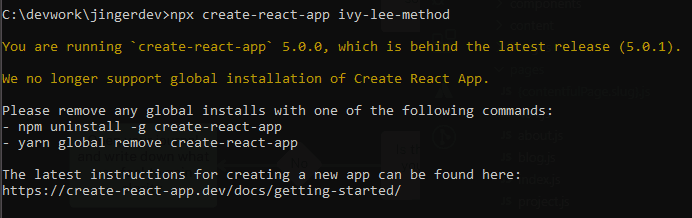
It says to remove global installs but even after doing so, it still showed the same message.
How to fix:
First, uninstall the global create-react-app with this command:
npm uninstall -g create-react-app
or
yarn global remove create-react-app
Next, clear the cache by running the command:
npx clear-npx-cache
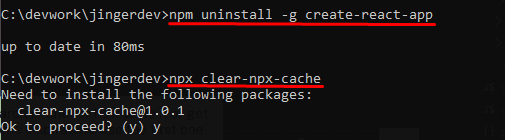
According to the npm page:
If you sometimes use a NPX-utility, you shall store an old version of this package in your cache. And every package update will not be seen by NPX. Cache clearing will solve this trouble. - https://www.npmjs.com/package/clear-npx-cache
If you don't have it installed yet, it will ask you to install the package. Or you can install it first with the command:
npm install clear-npx-cache
After that, you can run npx create-react-app your-app-name
It will ask you to install the new create-react-app package and you're good to go.

For accountability, I'm putting it here.
This year, one of my goals is to create a productivity app based on the Ivy Lee Method, which I just recently learned about from James Clear's blog.
I love how simple the idea is so I thought I'd make an app for it. Last year, I also created a Pomodoro app that's also built in React.